


Business Printers Australia | Laser, Inkjet, MFP, Label & Wide-Format
Reliable business printers from HP, Brother, Canon, Epson, Lexmark, OKI, Zebra and Dymo. Mono and colour laser, ink-tank inkjet, multifunction (MFP), thermal label printers and wide-format plotters — all genuine Australian stock with full manufacturer warranty. Free shipping over $99 and trade pricing for office rollouts. Call 1300 797 866 or email contact@techkingdom.com.au for tailored advice.
Top Business Printer Brands
How to Choose the Right Business Printer
Selecting a printer for an office, warehouse or retail counter comes down to volume, media type and total cost per page. The right model pays for itself in productivity, while the wrong one becomes an ongoing cost centre. Here's our buying guide for Australian businesses.
1. Laser printers — for high-volume office work
Mono and colour laser printers remain the workhorses of Australian offices. They deliver fast first-page-out, sharp text, and the lowest cost per page on toner. HP LaserJet Enterprise, Brother HL-L series and Lexmark MS/MX models are popular choices for teams printing 500+ pages per month. Look for duplex (double-sided), gigabit Ethernet, and AirPrint/Mopria support for mobile printing. Shop laser printers.
2. Inkjet & ink-tank — for colour-critical and low-volume
Modern ink-tank printers (Epson EcoTank, Canon MegaTank, HP Smart Tank) have transformed inkjet economics — refillable bottles deliver 4,000-7,500 pages per set at a fraction of the cost of cartridges. Best for small offices, home-based teams and any role needing photo-quality colour. Standard cartridge inkjets still suit very low volumes (under 100 pages/month). Shop inkjet printers.
3. Multifunction (MFP) — print, scan, copy, fax
A multifunction printer (MFP) consolidates print, scan, copy and fax into one footprint — ideal for small-to-medium offices. Look for an automatic document feeder (ADF) of 50+ sheets, duplex scanning, scan-to-email/folder/cloud, and a colour touchscreen. HP LaserJet Pro MFP, Brother MFC, Canon imageRUNNER and Lexmark MX series cover everything from 5-person offices to busy reception desks. Browse MFPs.
4. Label & barcode printers — warehouse and retail
Thermal label printers from Zebra, Dymo and Brother handle shipping labels, barcodes, asset tags, name badges and shelf-edge tickets. Direct thermal models suit short-life labels (shipping, receipts) while thermal transfer using ribbons gives durable barcodes that survive sunlight, abrasion and chemicals. The Zebra ZD series and Dymo LabelWriter are favourites for ecommerce dispatch; industrial Zebra ZT models suit high-volume warehouses. Shop label printers.
5. Wide-format & plotters — A2, A1, A0
Architects, engineers, surveyors and signage teams need wide-format printers for plans, posters and CAD drawings. The HP DesignJet T series and Canon imagePROGRAF prints up to 36" or 44" wide on bond, photo and matt media. Choose pigment-ink models for archival output and UV resistance. Search wide-format printers.
6. Bulk-buying and managed print services
Standardising on one or two printer models across your offices simplifies driver management, toner stocking and IT support. We supply HP, Brother and Lexmark fleets to Australian businesses with bulk pricing and optional managed print contracts. Request a quote.
Most Popular Business Printers in Australia (2026)
Australia's top-selling office printers this year, from compact desktop laser to high-volume colour MFPs. Browse the full lineup in our Printers Collection or contact our team for a tailored recommendation.
Frequently Asked Questions
Laser or inkjet — which is better for an office?
For most Australian offices printing more than 500 pages per month, a mono or colour laser is more economical, faster, and produces sharper text. Choose ink-tank inkjet (Epson EcoTank, Canon MegaTank) only if you need photo-quality colour or print fewer than 200 pages per month. Avoid cartridge inkjet for any business use — the per-page cost is punishing.
What's the difference between a printer and an MFP?
A printer only prints. A multifunction printer (MFP) also scans, copies and (often) faxes. For most offices an MFP is better value — one device, one driver, one piece of furniture. Standalone printers still suit specialised roles like dispatch label printing or back-office bulk runs where you don't need scanning.
Direct thermal vs thermal transfer label printer?
Direct thermal uses heat-sensitive paper — no ribbon needed, lower running cost, but labels fade in sunlight and heat. Best for shipping labels and receipts that get used within months. Thermal transfer uses a wax or resin ribbon to print on durable label stock — labels last years and survive UV, chemicals and abrasion. Best for asset tags, outdoor barcodes and warehouse stock.
Do these printers work with Mac, AirPrint and mobile?
Yes — all current HP, Brother, Canon, Epson and Lexmark models support macOS, AirPrint (iOS), Mopria (Android) and Windows 10/11. Most also offer vendor apps (HP Smart, Brother iPrint, Canon PRINT) for mobile scanning and cloud printing to Google Drive, OneDrive and Dropbox.
Can I get bulk pricing on printers and toner for our office?
Absolutely. Orders of 3+ printers qualify for trade pricing, and we offer ongoing toner contracts at discounted rates. Email contact@techkingdom.com.au or call 1300 797 866 with your unit count and preferred models for a tailored quote.
Rolling out printers across multiple sites?
We help Australian businesses standardise on HP, Brother and Lexmark fleets with bulk pricing, staged delivery and optional managed toner. Get a custom quote.
Get Bulk QuoteTop Office Printers
Hand-picked top sellers from the category. All in stock with same-business-day dispatch.

Ricoh
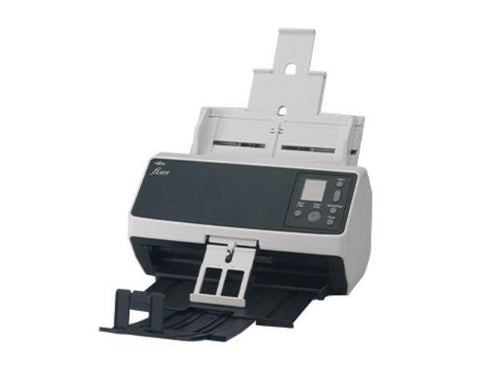
Ricoh FI-8170 Document Scanner (A4, Duplex) 70ppm, 100 Sheet ADF, 600 Dpi
$2,117.00
Out of Stock